The whole room,
on their own phone.
Captions and translation on every attendee’s phone, questions typed from the seat, and live polls, with nothing to install and no account for anyone in the audience.
Buenos días a todos y gracias por venir.
Empezamos con los resultados del año.
A code on screen.
Nothing else.
Put the QR up while the doors are still open. Showing it starts no event and spends no metered time. Or reserve a memorable code weeks ahead and print it on the programme.
- 1Show the codeThe join panel is drawn into your own output, over your video, and stays up until you take it down.
- 2They scan itTheir own camera. No app store, no account, no name, no email.
- 3They pick a languageThe attendee chooses, never the operator, and each one can choose differently.
A reserved code like ACME25 can be held for up to 90 days, so the programme can be printed before anyone is on site.
ACME25
scaption.app/live
Scan to follow the event
Buenos días a todos y gracias por venir.
Empezamos con los resultados del año.
Good morning everyone, and thank you for coming.
We’ll start with this year’s results.
Bonjour à tous et merci d’être venus.
Nous commençons par les résultats de l’année.
Should we extend the Q&A by ten minutes?
What they hold
in their hand.
A plain web page, no download, no sign-in. It carries the last lines of the event in the language they chose, and it can read them aloud with the phone’s own voice.
- Read in their language58 to choose from, and up to twelve different ones running in the same event.
- Or listen to itHeadphones on and the phone speaks the line in its own voice. It never leaves the device, so it costs nothing and scales to everybody.
- Ask from the seatTyped on the same page they are reading, sent to the moderator, never straight to the screen.
- Vote when askedA ballot appears on the same screen while the poll is open, in their own language.
The audio is the phone’s own system voice, not a dubbing service, which is exactly why there is no per-listener bill and no cap on how many people turn it on.
A panel for whoever
is running the room.
Built for an iPad and opened with a link: the event’s organiser can moderate without a SCAPTION account and without standing at the desk. It is the same panel a seat holder gets from the dashboard, so the two can never drift apart.
From the floor
Will the slides be shared afterwards?
Take downOn screenHow does this work with a hybrid audience?
LaunchWhat happens when the connection drops?
LaunchRunning order
- 1Welcome and this year’s results
- 1.1Where are you joining us from?Vote
- 2Product roadmap
- 2.1Which release matters most to you?Vote
- 2.2Open questions from the floorQuestion
Questions and votes written days ahead, grouped into blocks, launched with one tap on the day. Written by the organiser, from the same link.
The whole room. The QR, the running order, the results, the moderation panel, and the AI summary of the day.
The day-of panel alone: the questions and the votes, nothing else. The narrower of the two by design.
The scope travels inside the signature, so editing the address of one will not turn it into the other.
While a vote is open nothing else can be launched from anywhere. The venue screen has one card slot, and a stray tap must never end a count the room is still reading.
They ask from their seat.
You decide what goes up.
No hand raised, no runner with a microphone, nobody talking over anybody. The question is typed, the room upvotes it, and the moderator puts it on screen when the moment comes.
- 1They type it
On the same page they are reading. Everyone else can upvote it, so the room decides what matters.
- 2You review it
Nothing reaches the venue screen without a moderator putting it there.
- 3It goes up
The card is drawn into your own output, placed anywhere on a nine-point grid.
- 4It is answered aloud
Whoever is on stage answers out loud, and the captions pick that up like any other line.
- 5It lands in the summary
The launched question (and every closed vote) is folded into the AI Summary of the event.
There is no “answer” box anywhere in SCAPTION, and that is deliberate: the answer belongs to the person on stage, and the room already has captions.
Ask the room.
Read the answer.
Open a vote from the panel and the ballot appears on every phone at once. The tally is drawn on the venue screen while it comes in, and the result is kept when you close it.
Ballots
The fastest question there is.
When abstaining is a real answer.
For options already on the speaker’s slide. The letters are never translated, because a translated “A” would be wrong.
Up to six answers you type yourself, translated for every reader.
Should we extend the Q&A by ten minutes?
412 votes
- A vote is stored by POSITION, never by the label, so the same answer read in six languages can never split the count.
- Six answers is the ceiling, and it is arithmetic rather than taste: the card is furniture on top of your video, and eight rows would eat the picture the captions sit on.
- Closed results go into the AI Summary and can be exported as a CSV.
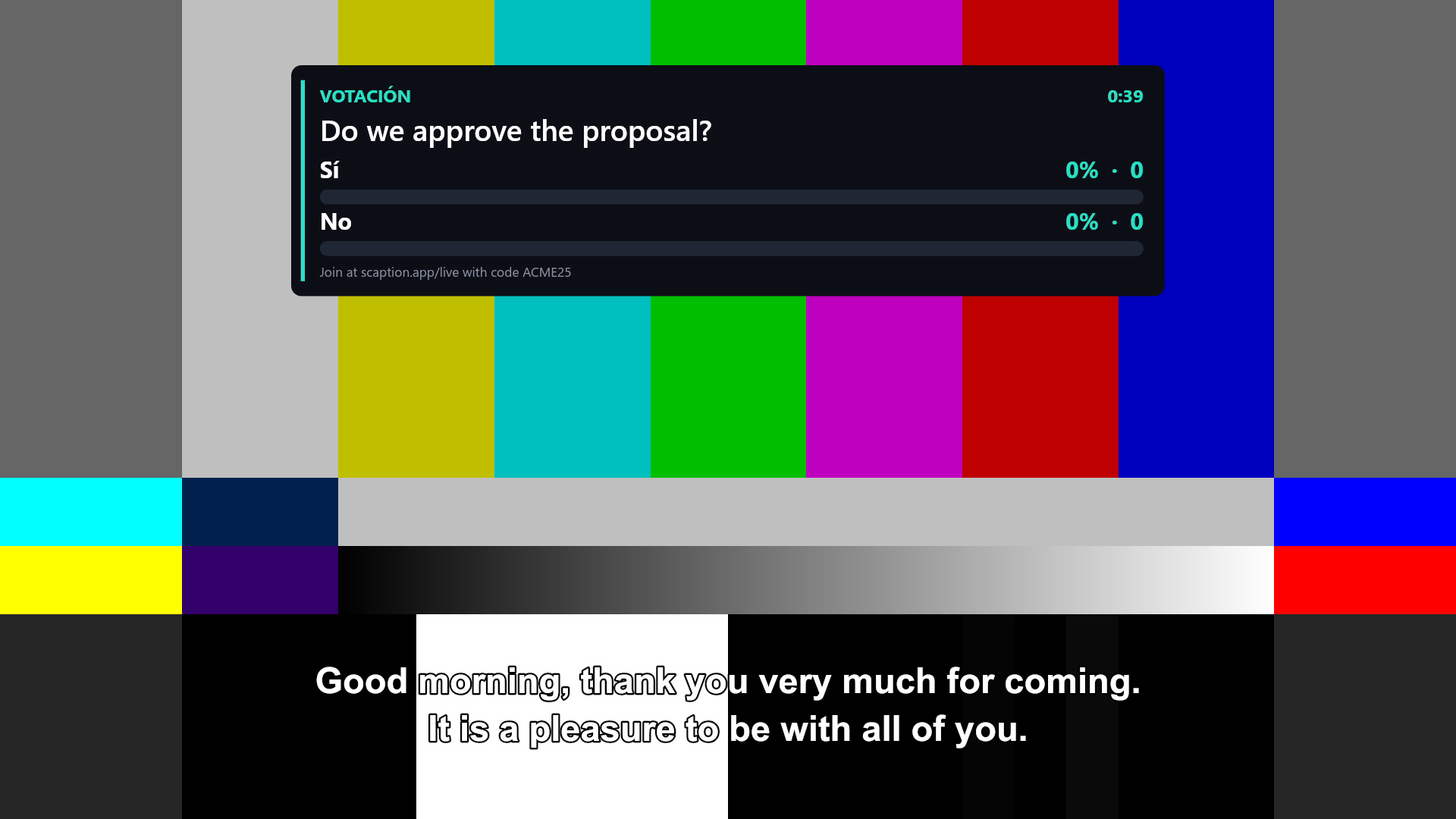
The card lands on
your own output.
The question and the poll are drawn into the same transparent NDI frame as the captions, so your switcher composites them straight over the programme, no second machine, no extra layer to key.
- Placed anywhere on a nine-point grid, from the console or from the panel.
- Set in your own caption font, so one screen never looks like two products.
- Captions can be hidden entirely for an event run on the interaction alone. The phones still get every word.
- And with no switcher at all, the same card and the same captions appear by opening the caption screen on any TV with a browser.
Measured, not estimated.
1,000
attendees per room, at most
58
languages in the catalogue
~1.7s
from the word to the translated caption
€0
per attendee and per language
Measured against the deployed backend: one room held 5,000 simultaneous connections with nothing refused and nothing undelivered. We sell 500–1,000 per event because that is where arrival time still meets our own promise, and the ceiling nobody controls is the venue’s wifi.
Nobody in the audience
signs anything.
No name, no email, no account, no app.
While the event is live, nothing is stored at all.
A question put on screen and a closed vote are kept, and deleted automatically after 30 days.
Audio is processed in your account’s region (the EU by default for European accounts), and never trains an AI model.
The room code is how people get in, not a confidentiality control: anyone holding it can read along. That is stated on the attendee page too. For a closed session, use the venue screen alone.
Full detail in the privacy policy.
Part of the product, not an add-on.
Access is in every plan. From Event Pro up it carries translation into 58 languages; on Accessibility the audience still follows the event on their phone, in the language being spoken. There is no charge per attendee and none per language, not for one, not for a thousand.
Leave no one out.
Try it before your next event. One hour free, no card.